Driver Settlement

Right now if a driver is paid base on percentage then that percent is taken from the primary fee but when the settlement is created there is no way for that number to show on the settlement. It only shows the gross pay for the load which is not where there percentage is coming from. This causes confusion on the driver's part. It would be great if there was on option on my end instead of showing gross pay on settlement it could show primary fee for each load.
-

If I understand your question correctly, you need to click the settlement summary at the top of the page within the driver's settlement to see the percentage breakdown. This is a screenshot of one of my drivers. The driver will see this once it's emailed to them. Each load should have a breakdown per the line item you set up, with a percentage in the driver contract (e.g., Additional detention).
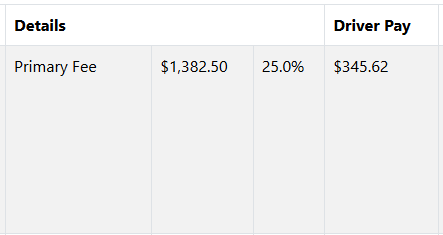 0
0 -
When I go through those steps it does not show primary fee on my screen. It shows the gross revenue then load the driver pay(which is based on primary fee not the gross). So when they do the math from the numbers on their settlement, it does not add up.
0 -

I have the Pro version and I don't have a “settlement summary” on the drivers settlement page, it offers a “settlement details” button which shows gross revenue (primary (what we call the linehaul rate) & the fuel surcharge combined). I saw another thread on this that said you can remove the fuel surcharge from the gross on the driver settlements via the “contracts” you can access and set up in driver settings. That did not work.
1
Please sign in to leave a comment.
Comments
3 comments